
The 10 Best Apps for iPhone Duo
Only apps with a public source showing iPhone Duo support: Apple's own announcement, or the developer's release notes or blog.
By Conscious Engines Studio · · 12 min read
The best apps for iPhone Duo right now are the ones whose developers have shown their work: Fantastical, Slack, Zoom Workplace, Tasks, Duet, Highlights, Bear, Drafts, Netflix and Detail all have a public source confirming iPhone Duo support. Start with Apple's own apps, which Apple says are optimised for Duo, then add these for calendars, work chat, meetings, projects, PDFs, notes, video and filming.
Prices checked on 20 October 2026. iPhone Duo goes on sale on 23 October, so this is a launch list. It's based on what Apple and each developer have published. It isn't a hands-on review, and we'll update it as more apps ship.
What "made for iPhone Duo" means
Every iPhone app on the App Store runs on iPhone Duo. How well it fits depends on how the developer built it. Apple's developer guidance says apps built with the iOS 26 SDK or earlier sit in the middle of the open display with empty space around them. Apps built with the iOS 27 SDK fill most of the inner display. Apps built with the iOS 27.1 SDK or later use the full display, with toolbars and tab bars running down the side.
Apple also added a way to spot Duo-ready apps. When a developer submits iPhone Duo screenshots, the app's App Store product page shows a badge saying it's optimised for iPhone Duo. From April 2027, every new submission will need Duo screenshots.
Our rule for this list was simple. An app only made it if Apple named it, or if the developer said in its release notes or on its own blog that it supports iPhone Duo.
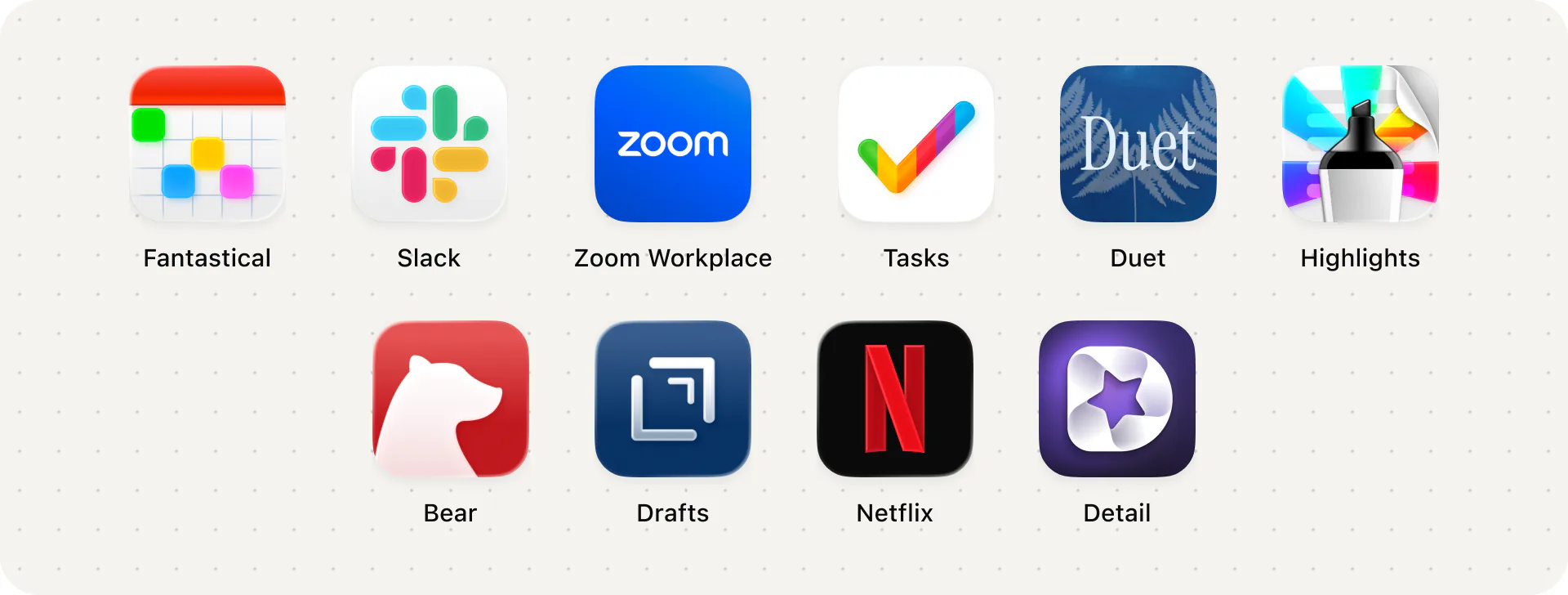
The list at a glance
| App | Best for | Price model | AI | Offline | Devices |
|---|---|---|---|---|---|
| Fantastical | Calendars and scheduling | Free; Premium $6.99/month or $56.99/year | None listed | Not stated | iPhone, iPad, Mac, Apple Watch |
| Slack | Work chat | Free plan; paid plans per user | AI search and summaries | Needs a connection | iPhone, iPad, desktop, Android, web |
| Zoom Workplace | Video meetings | Free Basic plan; Pro from $14.16 per user/month (annual) | AI features | Needs a connection | iPhone, iPad, desktop, Android, web |
| Tasks | Projects and to-dos | Free; Plus $3.99/month, $24.99/year or $59.99 lifetime | Connect AI assistants to projects | Not stated | iPhone, iPad, Mac, Apple Watch, Vision Pro |
| Duet | Thinking through PDFs | $19.99 one-time | On-device Apple Intelligence; optional Private Cloud Compute | Yes, including AI | iPhone, iPad, iPhone Duo |
| Highlights | Annotating and exporting PDFs | Free; Pro $4.99/month or $29.99/year | Apple Intelligence Writing Tools; Siri questions | Yes (files can stay on device) | iPhone, iPad, Mac |
| Bear | Markdown notes | Free; Pro $2.99/month or $29.99/year | None listed | Yes; sync needs Pro | iPhone, iPad, Mac, Apple Watch |
| Drafts | Quick text capture | Free; Pro $2.99/month or $29.99/year | Optional links to AI services | Not stated | iPhone, iPad, Mac, Apple Watch |
| Netflix | Films and series | Free app; Netflix membership | None listed | Downloads on iPhone | Phones, tablets, TVs, browsers |
| Detail | Filming and editing video | Free; Pro subscription | On-device Auto Edit; AI teleprompter | Auto Edit works offline | iPhone, iPad |
Start with Apple's own apps
Apple says its own apps are optimised for iPhone Duo, and its design guidelines use them as the examples. Mail shows either your inbox or one email when the phone is closed, and both side by side when it's open. Notes keeps its sidebar and note visible as you fold the phone, adjusting the width of each pane. Calculator uses the full width of the display. Safari can open two windows side by side for comparing pages.
Apple's iPhone Duo page also shows dragging a photo from Photos into an email in Mail, with the two apps side by side in Split View. If you're new to the phone, spend a day with Mail, Notes, Safari and Photos before you install anything else. They show you what a well-adapted app feels like.
1. Fantastical
Duo support: Fantastical 4.2.3, released on 13 October 2026, added support for iPhone Duo, according to its App Store release notes.
Fantastical is a calendar app that turns plain-language typing into events, with day, week, month and year views. It's a strong fit for the outer display, where you want to check the day with one hand, and for the open display, where there's room for a week.
Good at: natural-language event entry, calendar sets, and scheduling tools in Premium such as availability-based openings and meeting polls.
Trade-off: Flexibits hasn't published what changed on Duo beyond the one line in the release notes. The best features need Flexibits Premium at $6.99 a month or $56.99 a year.
Price and platforms: free download; Premium subscription. iPhone, iPad, Mac and Apple Watch.
2. Slack
Duo support: Apple named Slack in its iPhone Duo announcement as one of the first apps using the larger display, bringing a whole workspace into view. Slack's latest release notes (version 26.10.20, 14 October) don't mention Duo.
If your work happens in channels, the inner display gives Slack room to show more of a workspace at once. It also pairs well with another app in Split View: a document on one side, the thread about it on the other.
Good at: project and customer conversations in channels, with AI search and conversation summaries.
Trade-off: our only source is Apple's announcement. Slack hasn't described its Duo layout itself. It also needs a connection, and the AI features depend on your workspace's plan.
Price and platforms: free plan; paid plans priced per user. iPhone and iPad, plus desktop, Android and web.
3. Zoom Workplace
Duo support: Apple named Zoom in its announcement, describing the inner display as a video conference room. Zoom's latest App Store release (7.2.1, 28 September) doesn't mention Duo.
Zoom is one of the clearest reasons to want a phone that stands up on its own. Apple says iPhone Duo can be propped on a surface for hands-free calls, which suits a meeting you'd otherwise take on a laptop.
Good at: video meetings, chat and scheduling in one app, with AI features built in.
Trade-off: as with Slack, the Duo detail comes from Apple; Zoom hasn't described its Duo layout. The free Basic plan limits meetings to 40 minutes.
Price and platforms: free Basic plan; Pro from $14.16 per user per month billed annually, or $16.99 monthly. iPhone, iPad, desktop, Android and web.
4. Tasks
Duo support: Tasks 5.2, published on 13 October 2026, is titled "Made for iPhone Duo" on the developer's blog, which explains exactly what changed.
Tasks is a to-do and kanban app. Its Duo write-up is one of the most detailed we found. Closed, it behaves like it does on any iPhone, one column at a time. Open, it shows the sidebar and the board's columns side by side, and you can hide the sidebar to give the board the full width. Half-folded, an open card sits on the half facing you. Fold and unfold, and Tasks keeps your place and anything you were typing.
Good at: simple lists that grow into projects with boards, tags, time tracking and shared projects.
Trade-off: the blog post doesn't cover Split View or multiple windows. Shared projects and some features need Tasks Plus.
Price and platforms: free; Tasks Plus $3.99 a month, $24.99 a year or $59.99 for life. iPhone, iPad, Mac, Apple Watch and Vision Pro.
5. Duet
Duo support: we make it, and it's designed for every pose of iPhone Duo.
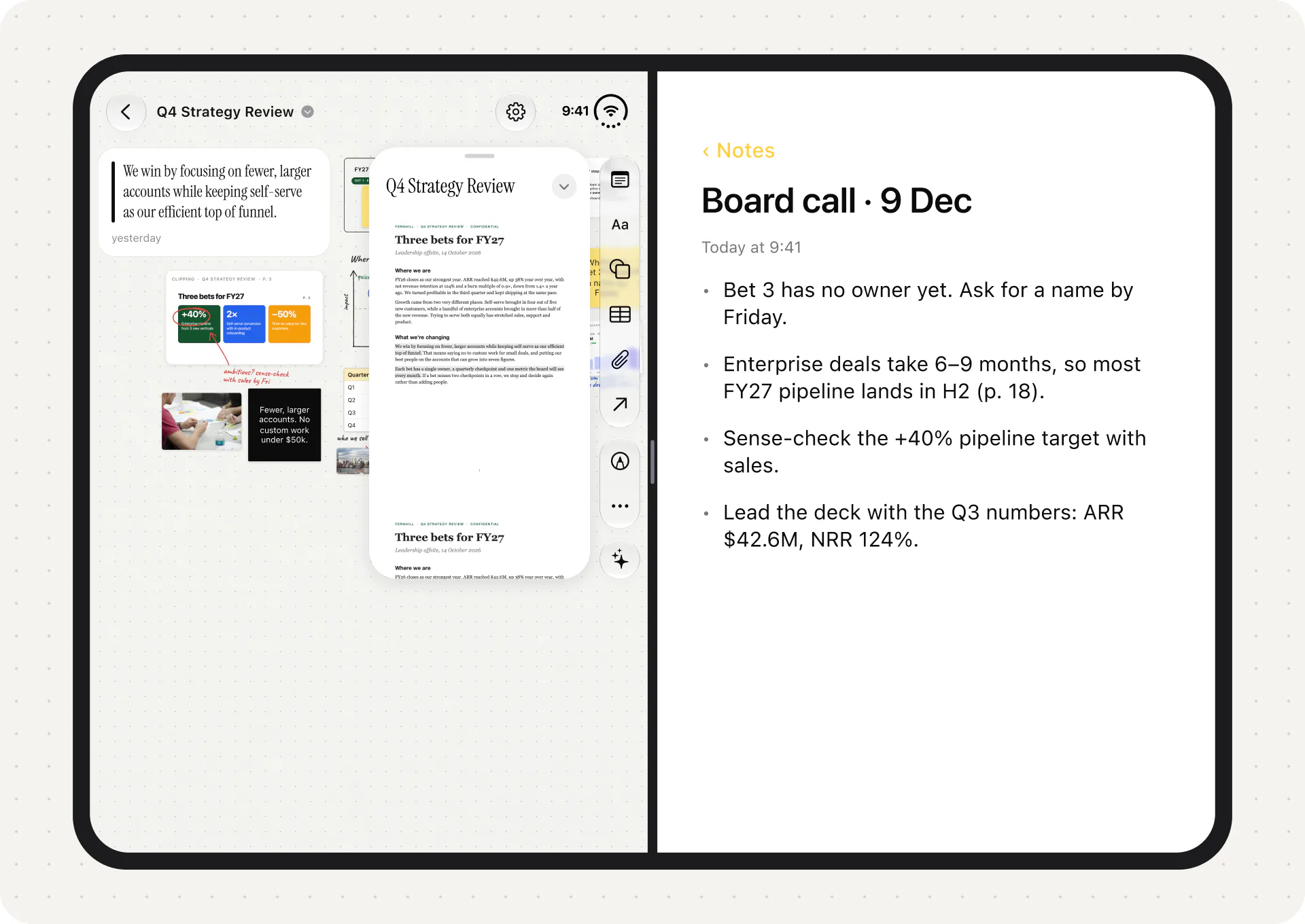
Duet is a PDF reader for documents you need to think through: board packs, research papers, contracts. Closed, it's a one-handed reader with tools down the side. Half-open like a book, the highlights for the current page sit beside it. Fully open, the page and its Canvas sit side by side, and every highlight arrives on the Canvas as a card linked to its page. Flat on a table, the content goes on the top half and the controls on the stable bottom half. Split View lets you keep two reports open at once.
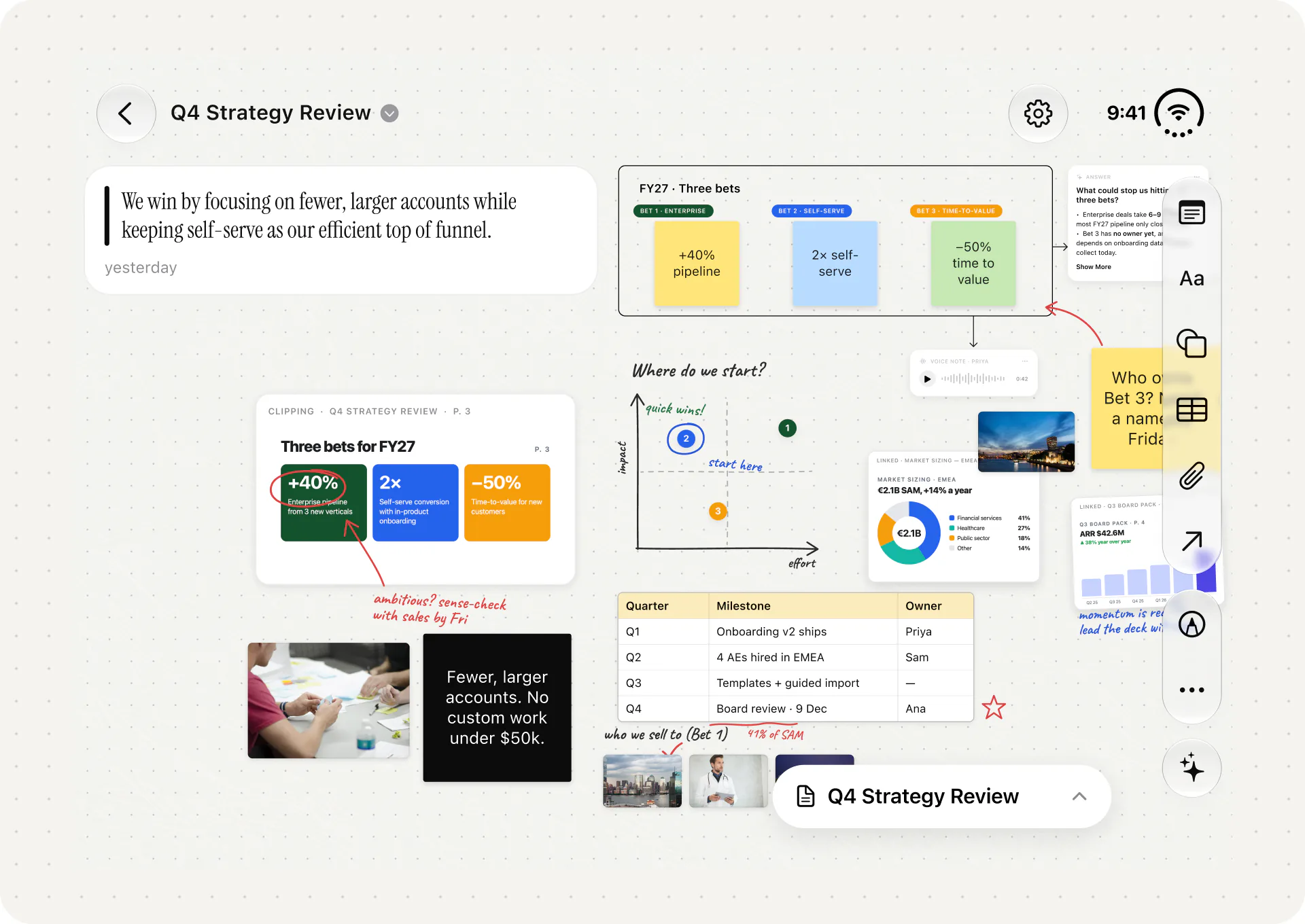
Good at: the Canvas (clips, sticky notes, shapes, arrows, tables, photos, finger ink, voice notes), and private AI that answers from your document with page citations. The AI runs on the device through Apple Intelligence and works offline. You can allow Apple's Private Cloud Compute for bigger questions.
Trade-off: Duet doesn't edit, sign or fill in PDFs. There's no iCloud sync, no Mac app and no export of highlights yet. Apple Pencil on Duo isn't supported yet; ink is finger-only. More in Duet: Made for iPhone Duo.
Price and platforms: $19.99 one-time, no subscription, no account. iPhone, iPad and iPhone Duo; requires iOS 27.
6. Highlights
Duo support: Highlights shipped its iPhone Duo release as version 2026.3 on 10 October 2026, followed by 2026.3.1 on 19 October, according to its App Store release notes.
Highlights is a PDF reader and annotation app aimed at students, academics and researchers. On Duo, a new Auto page layout switches from one page to two pages side by side when you unfold the phone, so a PDF reads like an open book. PDFs run edge to edge on both displays, the toolbar floats in a vertical bar, and you can tap the page to hide it. It also supports multiple windows, so you can compare two documents side by side on the inner display.
Good at: two-page reading, exporting your notes to Markdown, HTML and other apps, citations and table extraction.
Trade-off: most export features need Highlights Pro. It's built around annotations and export more than around reasoning on a canvas. We compare the two in Duet vs Highlights.
Price and platforms: free; Highlights Pro $4.99 a month or $29.99 a year, covering iPhone, iPad and Mac.
7. Bear
Duo support: Bear 3.0.2, released on 12 October 2026, says in its release notes that Bear is now ready for iPhone Duo.
Bear is a Markdown notes app with tags and links between notes. A notes app is one of the most useful things to have beside another app in Split View.
Good at: fast writing with hidden Markdown, nested tags and links that turn notes into a small personal wiki.
Trade-off: sync between devices, encryption and app lock need Bear Pro. Shiny Frog hasn't published details of its Duo layout.
Price and platforms: free; Pro $2.99 a month or $29.99 a year. iPhone, iPad, Mac and Apple Watch.
8. Drafts
Duo support: Drafts 54.1.1 says in its release notes that it's ready for iPhone Duo.
Drafts opens to a blank page with the keyboard ready, then lets you send the text wherever it needs to go. On the outer display, it's a quick way to catch a thought with one hand. On the inner display, it's a good scratch pad beside whatever you're reading.
Good at: capture first, organise later. Actions send text to other apps and services, and it links to AI services if you want it to.
Trade-off: the release notes don't describe what changed on Duo. Most of the power features need Drafts Pro.
Price and platforms: free; Pro $2.99 a month or $29.99 a year. iPhone, iPad, Mac and Apple Watch.
9. Netflix
Duo support: Apple named Netflix in its iPhone Duo announcement, describing Clips on the outer display and a larger view when you open the phone. Netflix's latest release notes (26.2.0, 19 October) don't mention Duo.
Video is where the inner display and the stand-up poses make the most obvious difference. Apple's iPhone Duo page shows setting the phone down to watch a show at a comfortable angle, with the controls at the bottom.
Good at: a familiar app with downloads on iPhone for watching offline.
Trade-off: you need a Netflix membership. The Duo details come from Apple; Netflix hasn't published its own.
Price and platforms: free app; membership prices vary by country and plan. Phones, tablets, TVs and browsers.
10. Detail
Duo support: Detail 6.0.4, released on 12 October 2026, says in its release notes that Detail now supports iPhone Duo, with details of what changed.
Detail is a video recording and editing app for creators. It makes more use of Duo's hardware than anything else we found. You can record with all three cameras: outer, inner and rear. When you film yourself with the rear camera, Detail can show your live preview, and your teleprompter script, on the outer display. A Book Mode shortcut records with the outer and rear cameras at once, so you can film yourself and what's in front of you.
Good at: a teleprompter that follows your speech, multicam recording and on-device Auto Edit that works offline once its models download.
Trade-off: Detail Pro is a subscription, and the App Store lists several price points, from $4.99 a week to $69.99 a year.
Price and platforms: free; Detail Pro subscription. iPhone and iPad.
Also confirmed for iPhone Duo
These apps also mention iPhone Duo in their App Store release notes. They didn't make the ten, but they're worth knowing about.
- CARROT Weather 6.9.2 (9 October): added iPhone Duo support and multi-window support.
- Overcast 2026.10 (9 October): interface improvements for iPhone Duo.
- Orion Browser by Kagi 1.5.6 (19 October): layout support for the inner and outer displays.
- Comet by Perplexity 26.40.0 (17 October): layouts for the folded and open screens.
- Sonos 90.1 (15 October): interface support for iPhone Duo.
- Phrase 1.7.0 (17 October): optimised layouts for new devices, naming iPhone Duo.
- PDF Viewer by Nutrient 2026.12 (9 October): an improved layout on iPhone Duo. We cover it in The Best PDF Readers for iPhone Duo.
How we chose
We started from one requirement: a public source showing iPhone Duo support, published by 20 October 2026. That meant Apple's own announcement, the app's App Store release notes, or the developer's blog. Apps that only had a rumour, a demo or a developer saying they were "working on it" didn't count.
From the apps that passed, we picked ten that cover the main things people do on a phone this size: plan the day, talk to colleagues, take calls, manage work, read and annotate, write, watch and film. We gave more credit to developers who explained what their app does on each display, because that tells you more than a single line.
When you've installed a few of these, try two at once. Our guide to iPhone Duo Split View and app pairs has twelve pairs for document work, and How to Read PDFs on iPhone Duo covers the built-in options.
To try Duet, visit duetreader.app or get it on the App Store.
FAQ
Do all iPhone apps work on iPhone Duo?
Yes. Every iPhone app on the App Store runs on iPhone Duo. Apps built with older tools appear in the middle of the open display with empty space around them. Apps built with the iOS 27.1 SDK or later fill the whole display.
How can I tell if an app is optimised for iPhone Duo?
Look for the iPhone Duo badge on the app's App Store page, which appears when the developer submits Duo screenshots. You can also check the app's release notes under Version History.
Which apps work in Split View on iPhone Duo?
Apple says all apps take part in multitasking on iPhone Duo, so any two apps can share the inner display. Apple says apps that already resize well on iPad are off to a good start on Duo.
Does Apple Pencil work on iPhone Duo?
Not yet. Apple says iPhone Duo will support Apple Pencil with USB-C later this year. Each app will still need to support it on Duo, so check before you rely on it.
What's the best PDF app for iPhone Duo?
It depends on the job. Highlights has the most complete Duo release for two-page reading and export, and Duet is built for thinking a document through on a Canvas with private AI. See The Best PDF Readers for iPhone Duo.
Sources
- Apple Newsroom, Apple unveils iPhone Duo, 9 September 2026.
- Apple Developer, Designing for iPhone Duo.
- Apple Developer, Three steps to make your app shine on iPhone Duo.
- Apple Developer News, Prepare and submit your apps for iPhone Duo, 5 October 2026.
- Apple Developer, Leverage multiple displays and scenes on iPhone Duo.
- Apple, iPhone Duo.
- App Store listings, checked 20 October 2026: Fantastical, Slack, Zoom Workplace, Tasks, Duet, Highlights, Bear, Drafts, Netflix, Detail, CARROT Weather, Overcast, Orion, Comet, Sonos, Phrase, PDF Viewer by Nutrient.
- Msquare Labs, Tasks 5.2: Made for iPhone Duo, 13 October 2026.
- Highlights, pricing.
- Zoom, pricing.
- Netflix Help Center, downloading titles.